The platform a South Los Angeles trade school runs on, from application to live class.
Custom Image is a 501(c)(3) trade school in ZIP code 90008. It teaches six imprint manufacturing trades and generative AI design. Between July and November 2026 the team designed and built the system the school operates on: admissions in three stages, live video classes, self-paced theory for seven programs, a design studio, instructor onboarding, online giving and a grant application. Each part is shown below with what it does, what it records and where it stops.
Workshop footage: Pexels. A stock clip, not the school’s own shop.
The classroom, onboarding and the studio
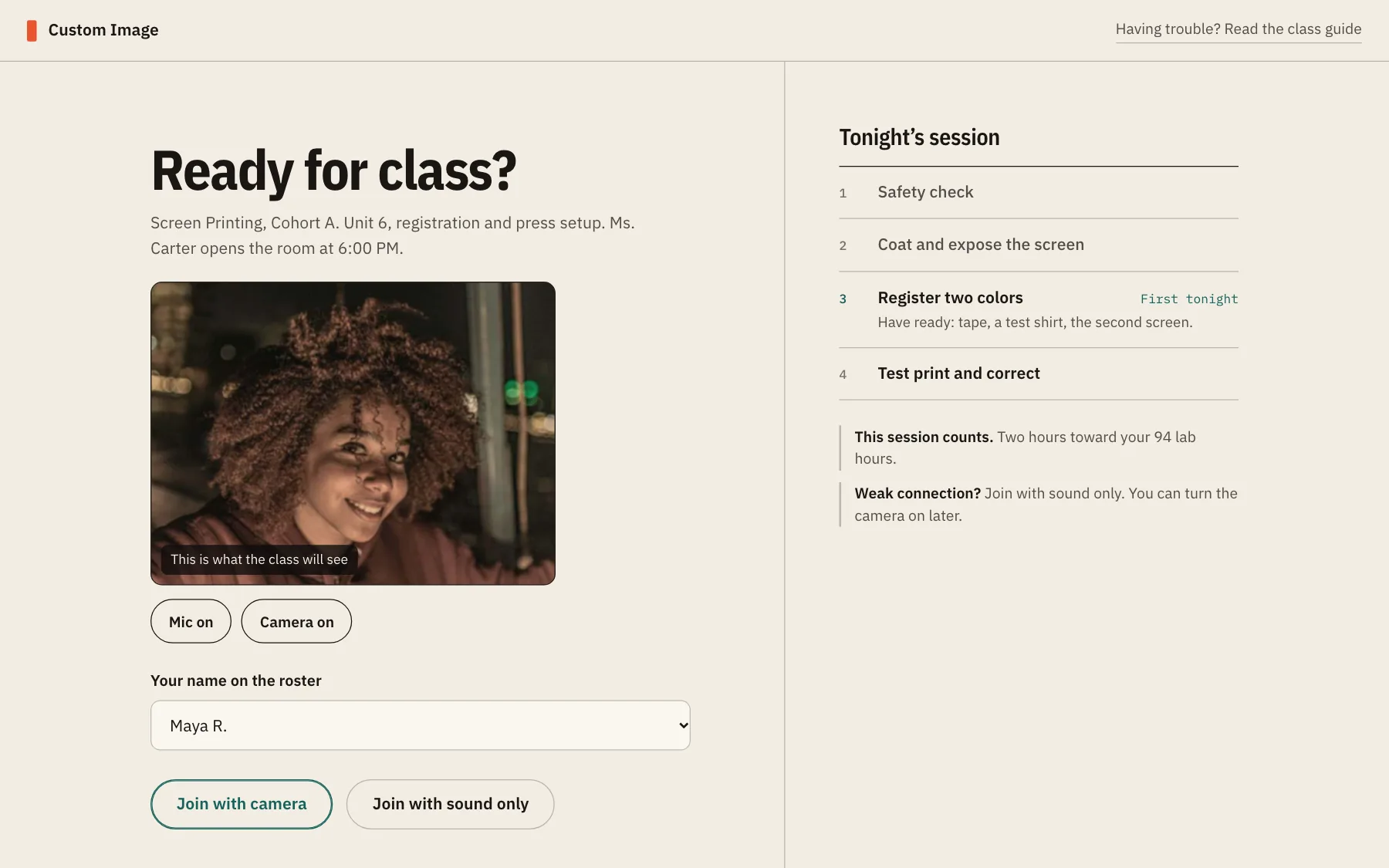
These interfaces carry the school: the live classroom, the onboarding of an instructor, the studio where design is taught, and the image generator inside it. Each was designed around what a trade class does, and each is shown here with sample data.
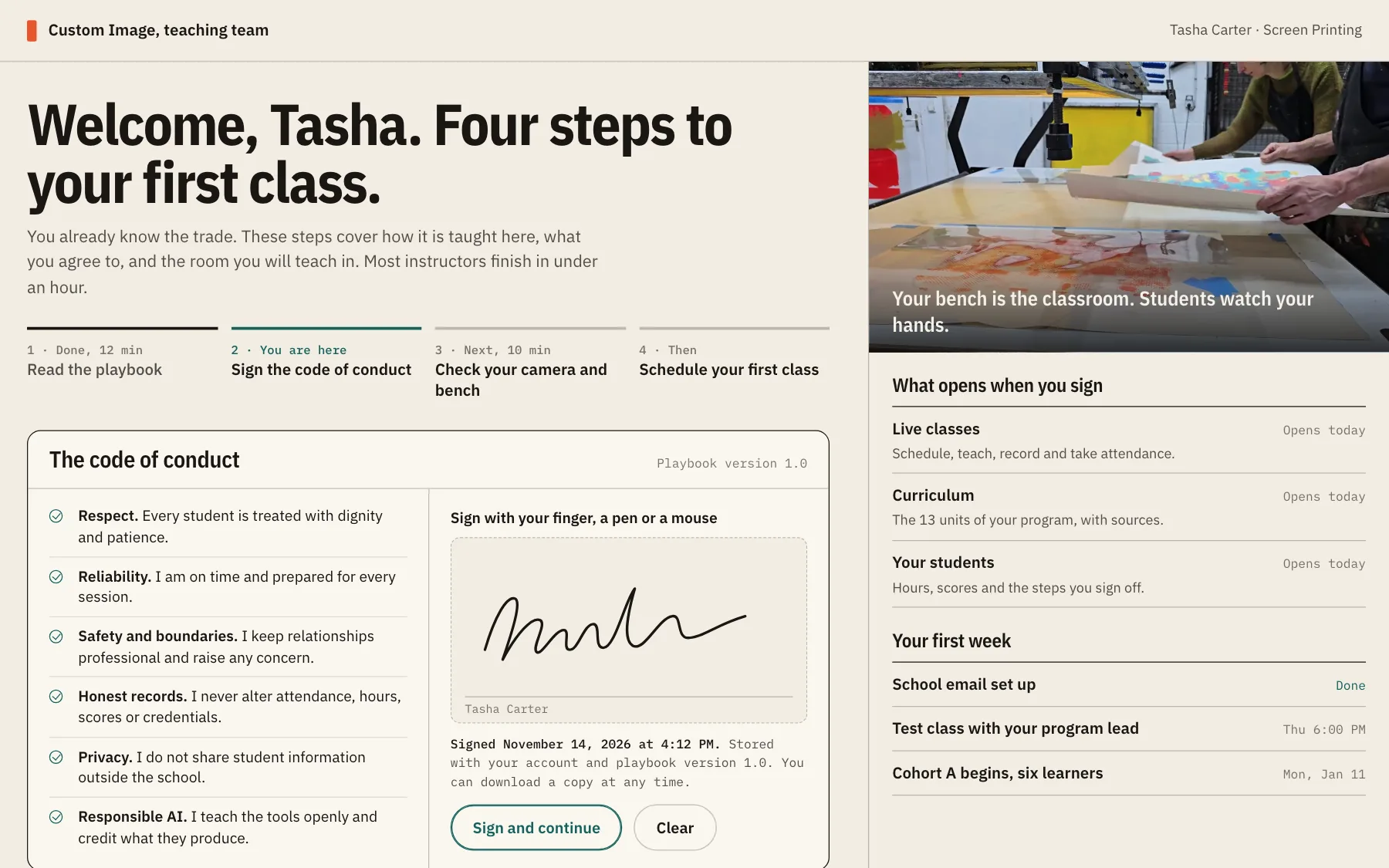
Instructor onboarding
The Design Studio

The image generator
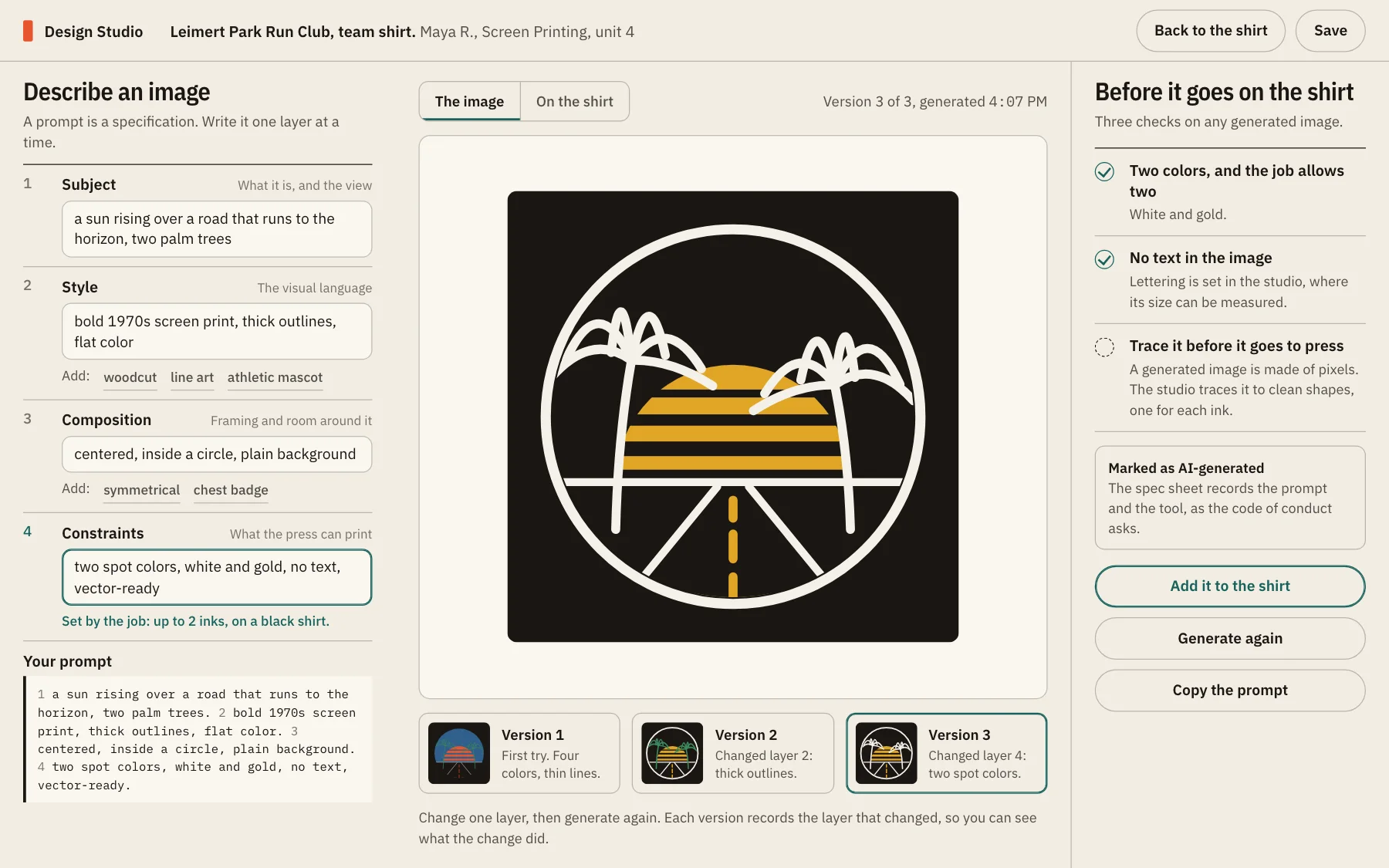
This is the final design, shown with sample data. The press footage is a stock clip from Pexels and the people on camera are stand-in photographs from Unsplash. The emblem in the image generator is a sample drawn for the design. The school’s live site still runs the earlier interface while this design is built into it.
The school
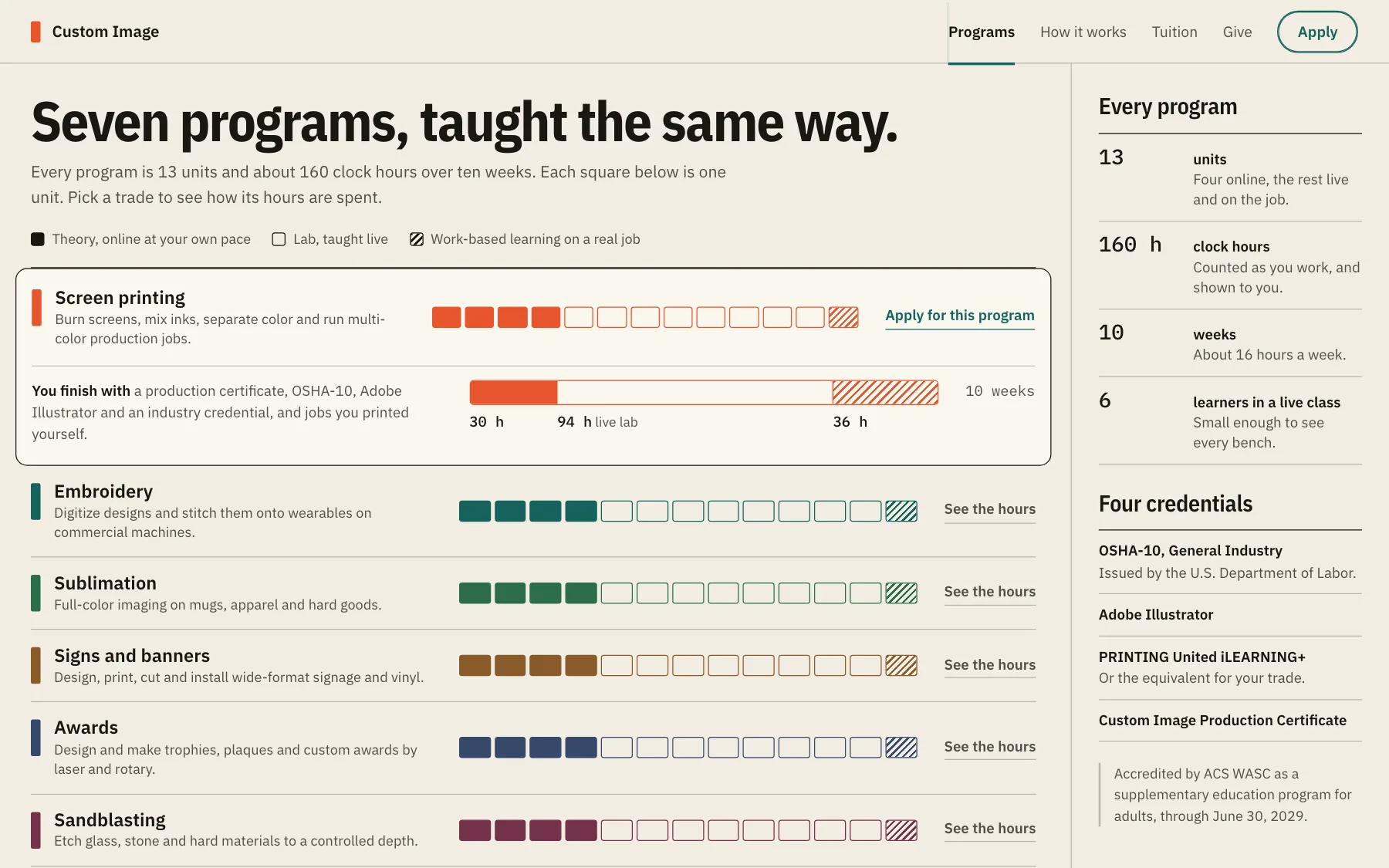
Custom Image teaches screen printing, embroidery, signs and banners, awards, sandblasting and sublimation, with a seventh program in generative AI design. Each program runs about 160 clock hours over about ten weeks. The school is accredited by ACS WASC as a supplementary education program for adults, with initial accreditation through June 30, 2029.
The school has no campus, and its instructor playbook describes it as fully remote: theory is self-paced online, supervised lab sessions are taught live in the browser, and work-based learning is done on real client briefs that the instructor reviews and signs off.
The application form asks each applicant which of five situations describes them: a high school student, a young adult aged 18 to 24, someone changing careers, someone in reentry, or a parent or guardian asking for a student. The school’s site names four feeder high schools, Crenshaw, Dorsey, View Park and Hawkins.
Source: customimage.org, its application form and its instructor playbook, as published in November 2026.
The place it serves
The school gives its service area as ZIP code 90008, which covers Baldwin Hills, Leimert Park and Crenshaw, and the ZIP codes around it. The four public figures below describe that area.
9.7M
Residents of Los Angeles County in the Census Bureau’s July 2025 estimate. It is the most populous county in the United States. The outlined bar is the second, Cook County, at 5.2 million.
$61,846
Median household income in ZIP code 90008. The outlined bar is the Los Angeles metropolitan area, at $95,958.
17.9%
Residents of 90008 below the poverty line. The outlined bar is the metropolitan area, at 12.7 percent.
20 of 61
Census tracts in 90008 and the five ZIP codes that border it that are designated Opportunity Zones under federal tax law.
Designated Opportunity ZoneOther census tractZIP code boundary
20 of 61 census tracts are designated Opportunity Zones in the six ZIP codes.
Sources: U.S. Census Bureau population estimates for July 1, 2025. American Community Survey 2020 to 2024 five-year estimates for ZIP code tabulation area 90008, read at Census Reporter. Opportunity Zones from the Internal Revenue Service’s list of designated tracts, Notice 2018-48, matched to the Census Bureau’s 2010 file relating ZIP code areas to tracts. A tract can lie in more than one ZIP code, so the rows add to more than the 61 distinct tracts. Only tracts with residents in a ZIP code are counted for it. The map is drawn from the Census Bureau’s 2010 boundaries for tracts and ZIP code areas, and a tract is shown whole even where part of it lies outside the six ZIP codes. The match is the team’s own arithmetic, and the school publishes no list of ZIP codes beyond 90008.
What was delivered, by department
A school has departments, and the platform was built for each of them. The eight are shown here, each drawn from its own numbers, and the sections that follow take them in turn.
Admissions
12 steps
Three forms take an applicant from interest to enrollment: four steps, then five, then three. Staff follow every applicant on one board.
The classroom
6 seats
A live video room for a cohort of six and an instructor. Every participant connects to every other, which makes 21 connections and sets the size of the room.
Curriculum
91 units
Seven programs of 13 units, about 160 clock hours each. The solid squares are the four theory units in each program that are taught online and gated by a check.
The studio
19 products
Templates in five groups: apparel, drinkware, packaging, signage and paper. The studio also generates images with AI from a prompt the student builds in four steps.
Faculty
5 documents
An onboarding guide, a playbook with the code of conduct, a class guide, a studio guide and an operations manual. The code is signed with e-signature technology built into the platform.
Advancement
$25 to $500
Online giving in five amounts, once or monthly, drawn to scale. Beside it sit a record of 16 funders and partners and a prepared grant application for $50,000.
Registrar
18 tables
Eighteen database tables and 52 functions that decide who may read or change a record, with an audit log that can only be added to.
Technology
4 apps
Instructor and student editions, each for macOS and for Windows, built automatically from the same pages that run in a browser.
Each department is drawn from its own count. The total behind them is 145 commits to the school’s repository between July 30 and November 11, 2026: 2 in July, 2 in August, 45 in September, 62 in October and 34 in November.
The admissions journey
One design carries an applicant from finding a program to the door of the first class, in seven stops. Sign-in is a link sent by email, so no stop asks for a password. Choose a stop to see its screen.
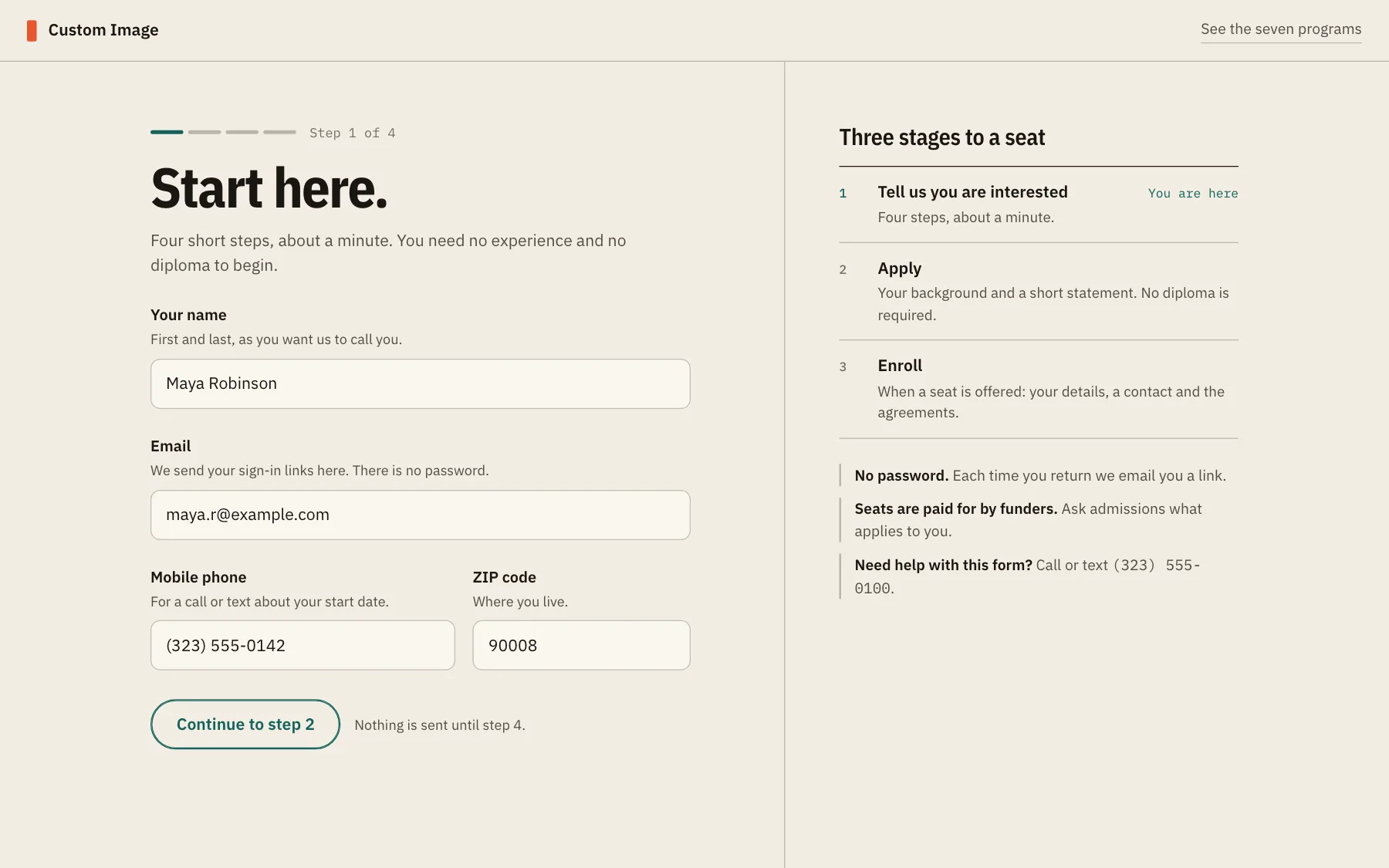
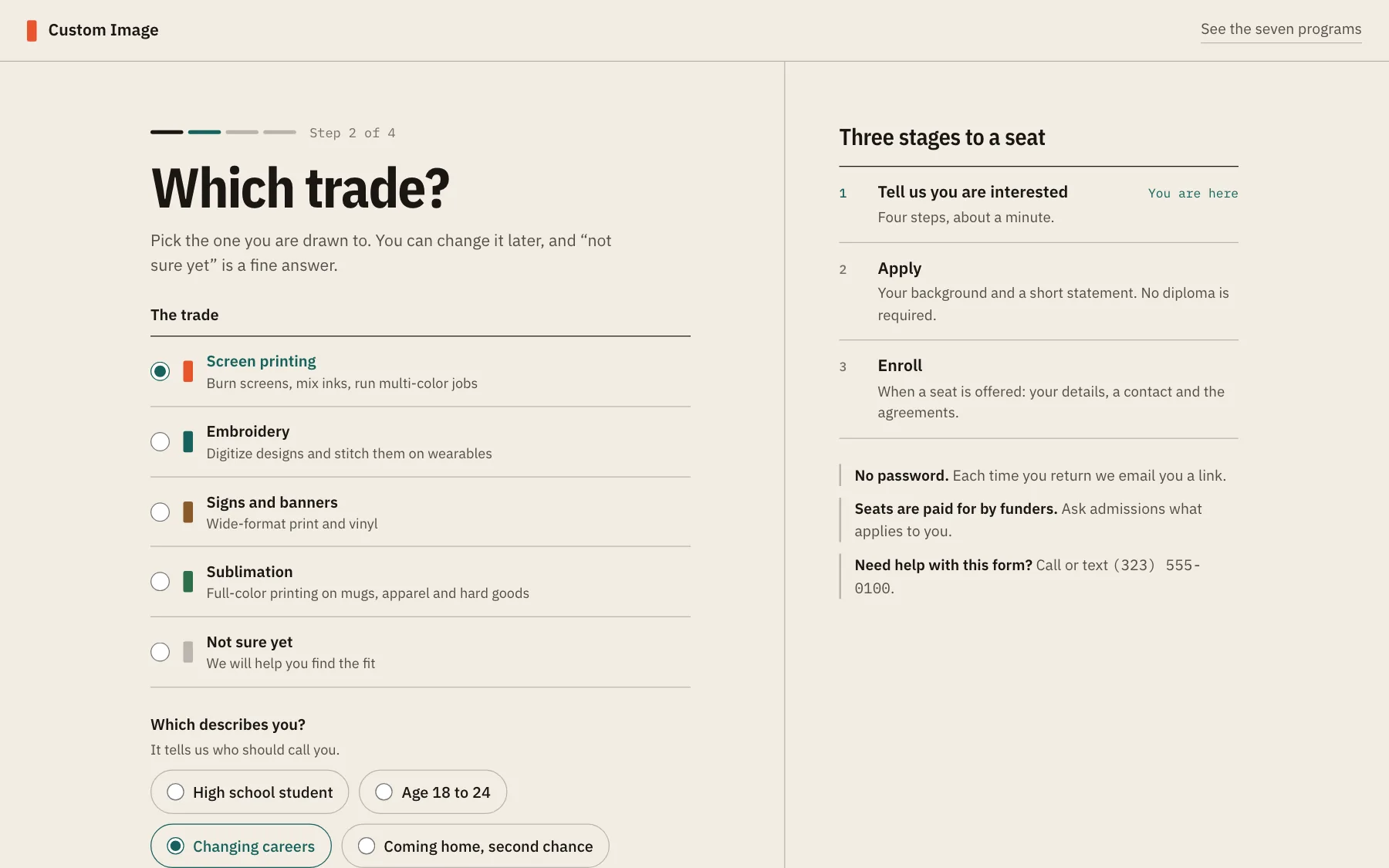
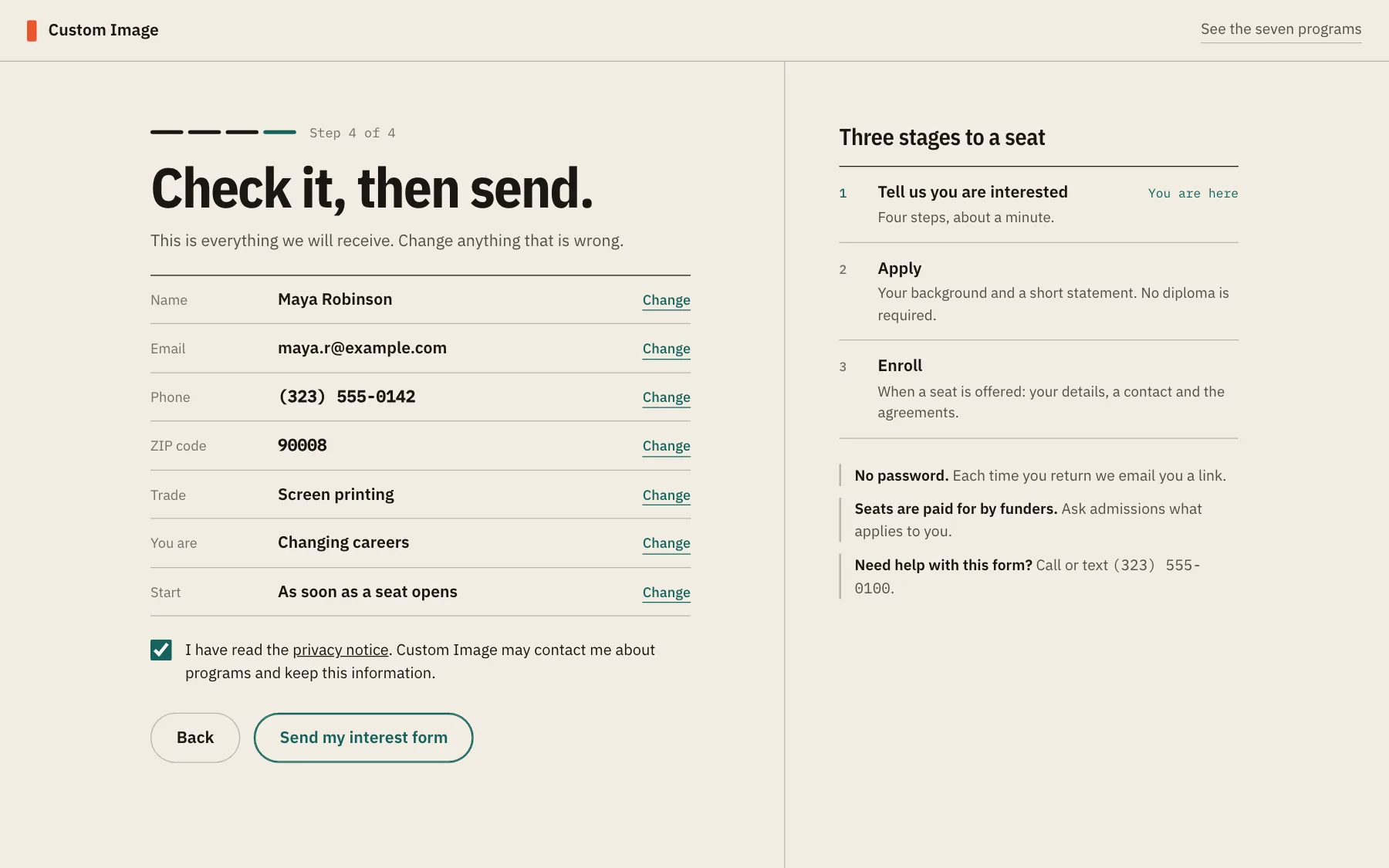
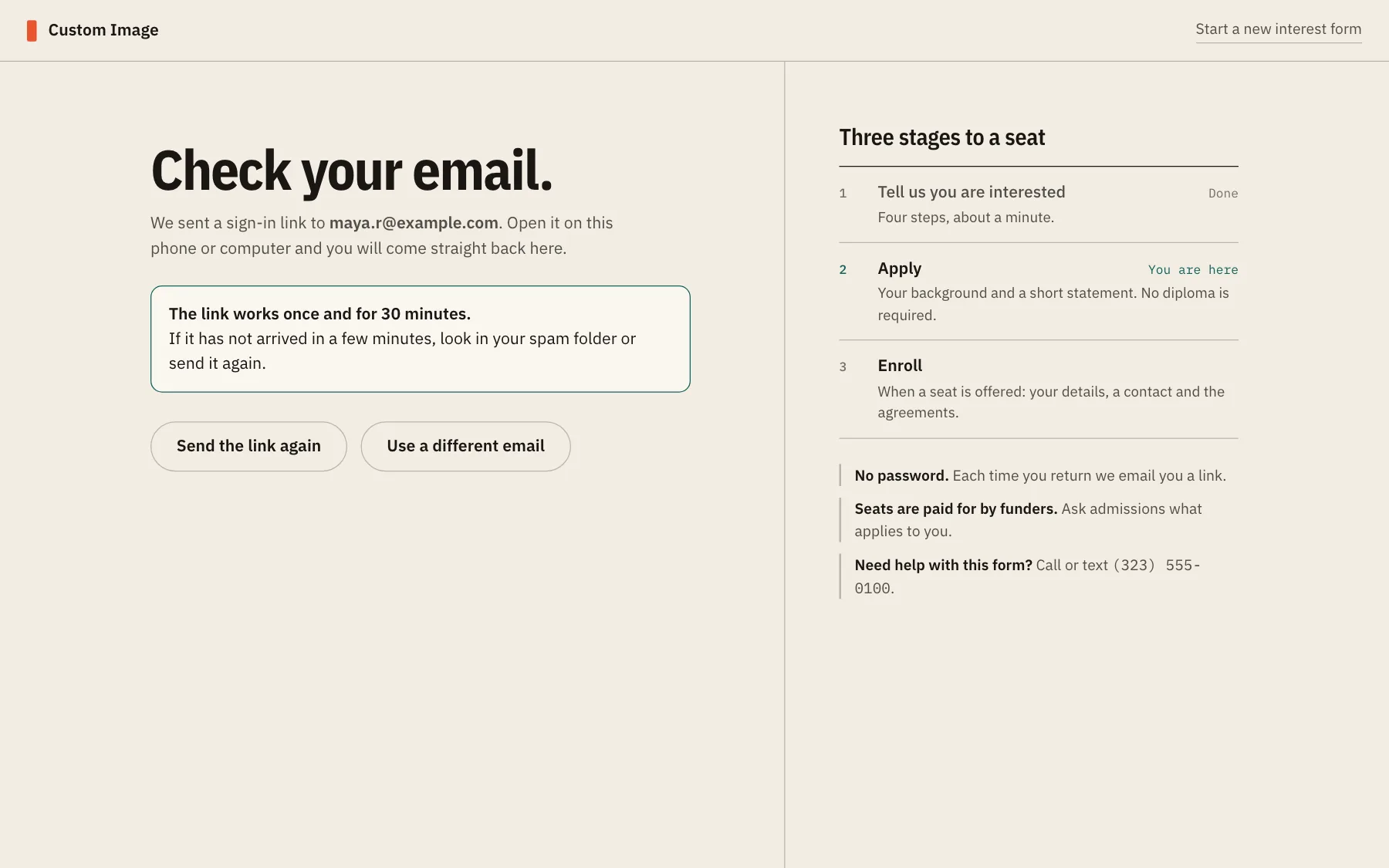
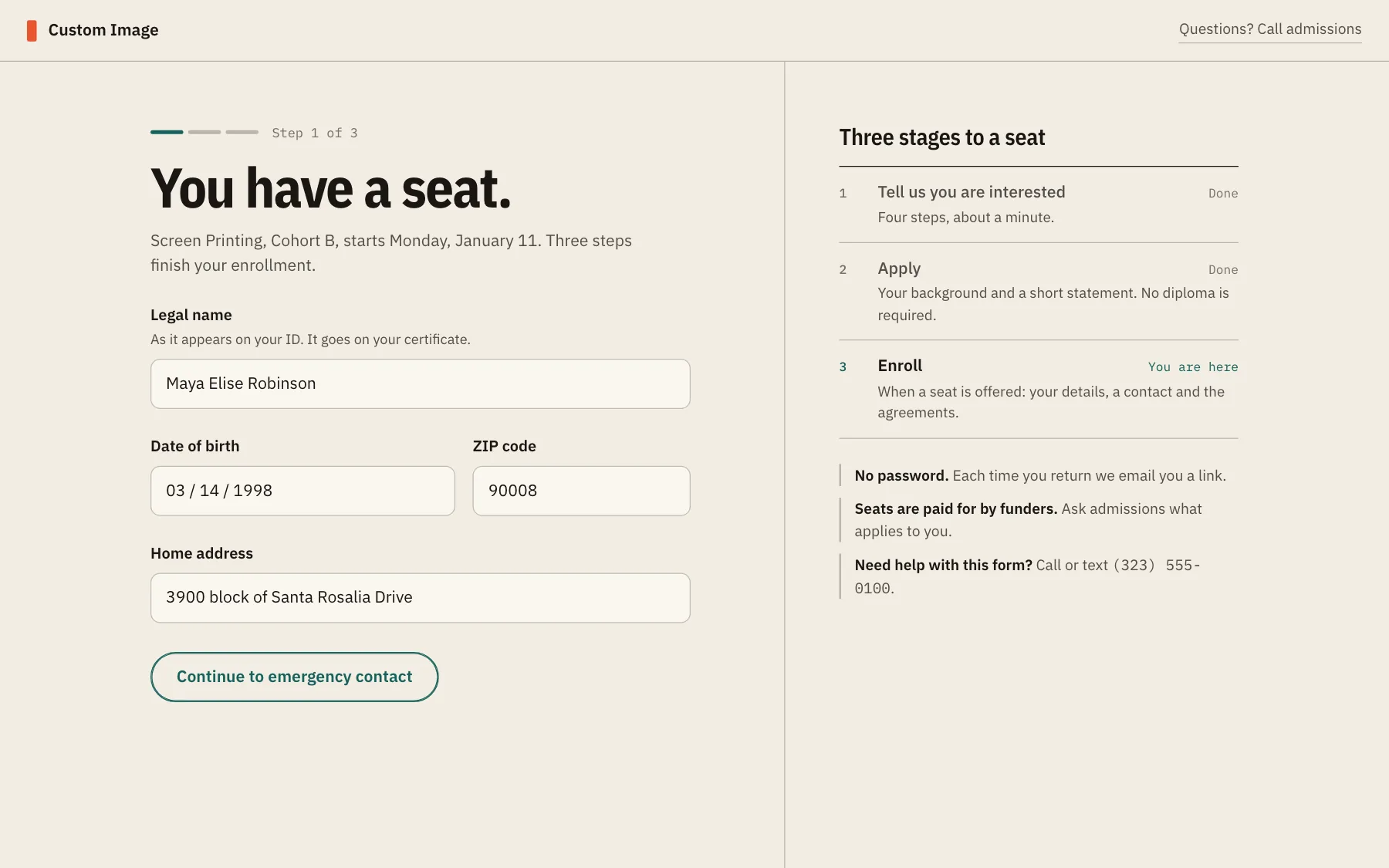
Find a program. The programs page shows every program as its units and hours.
The instructor and student apps
The classroom was also packaged as installed apps, in two editions, for macOS and for Windows. An instructor or a student who prefers a dedicated window gets one, with the camera, the microphone and screen sharing handled by the app. The apps are free to enrolled students and to staff, and everything in them also works in a browser.
macOS
Instructor and student editions as a .dmg, for macOS 11 and later, on Apple and Intel processors.
Windows
Instructor and student editions as an .msi installer, for 64-bit Windows 10 and 11.
Browser
The same classroom on any computer, tablet or phone, with nothing to install.
Each app is a download of 4 to 9 megabytes, built for both systems by an automated workflow whenever the code changes. The apps are not yet signed with Apple or Microsoft, so the first launch asks the user to confirm it once, and the download page explains how.
Funding: the request for support
A seat at Custom Image is paid for by someone other than the learner. The school is asking for that support from two directions at once: public programs and donors for access and seats, and the companies whose AI tools the design program teaches for sponsorship of that program.
Public rails are connectivity, workforce eligibility and tuition. Private compute is the AI companies invited to sponsor the design program. Every line is a request, and the table below gives where each one stands. Enrollment, completion and credentials are recorded as the platform runs, so the evidence a funder asks for is already on record.
$19,500
carries one learner the whole way, by the school’s own estimate: tuition, materials, safety gear, industry credentials and a supervised placement with an employer.
Give any amount
$25$50$100$250$500
Once or monthly, by card or a digital wallet, on the school’s own page. Custom Image is a 501(c)(3) public charity and gifts are tax-deductible.
Direct the gift
- Sponsor a seatA learner’s place in a cohort
- Equipment and materialsPresses, inks, supplies and safety gear
- Safety and credentialsOSHA-10 and the industry credentials a student carries out
Gold lines are public programs and blue lines are companies. The moving dots show direction only and are not amounts.
This page reports what was built, what was prepared and what was asked for. It reports no grant award, no sponsorship and no fundraising total.
Accreditation and the integrity of student records
Custom Image is accredited by the Accrediting Commission for Schools, Western Association of Schools and Colleges, known as ACS WASC, as a supplementary education program for adults. Its initial accreditation runs through June 30, 2029. The platform was designed to support the school’s obligations under the Family Educational Rights and Privacy Act, FERPA, which protects the education records of enrolled students.
What accreditation asks of the records
An accredited school has to show what was taught, for how many hours, and what each student completed. The platform records those facts as the work happens. Attendance is the time a learner joined and left a class. Clock hours are timed by the lesson player. A knowledge check is scored and the next module is opened by the database, and a lab or work-based unit is closed by a named member of staff. The curriculum was consolidated into one package for the commission, with the standard and the source behind each lesson.
The life of a record
- Interest formConsent to the privacy notice is stored with its version and the time.
- ApplicationBackground, a statement and any request for accommodation. No Social Security number is asked for.
- EnrollmentThe notice of education-record rights is acknowledged and stored.
- In attendanceThe record is now an education record. Attendance, hours, scores and sign-offs are written by the system.
- Every changeEach change of status is added to the audit log with the staff member’s identity.
- Never enrolledInterest data is deleted once its retention period has passed.
Who can see what
The role
James E. Coleman led the engagement as strategist, designer and engineer. The work was scoped against a signed proposal and tracked in a delivery record kept with the school. Each part of the role is shown with the figure that measures it.
52 deliverables
Strategy
Scoped against a proposal
Each line of the signed proposal was mapped to what was delivered, what remained, and what was built beyond it.
Wrote the operating documents
The manual of standard operating procedures, the instructor playbook, the guides and the school’s roadmap were written as part of the build.
Prepared the accreditation package
The curriculum was consolidated into one document for the accrediting commission, with standards, hours and the source of each lesson.
145 commits
Design and engineering
Designed every interface
Enrollment, the classroom, onboarding, the learning player, the studio and the staff console were designed as one system with one look.
Built the platform
The database, its access rules and functions, the video room, the recording, the e-signature, the lesson player and the studio were written for the school.
Shipped continuously
Every change was committed and deployed to the live site, with 107 of the 145 commits in September and October.
$50,000 requested
Funding
Researched the funders
Funders and partners were identified, tiered and recorded in the school’s own database.
Wrote the requests
The grant narrative, its need statement with Census sources, and the sponsorship invitations to four AI companies were drafted for the school.
Put giving online
The giving page was built so that a gift can be made and directed on the school’s own site, without sending the donor to a separate donation site.
What the team would do differently
Hold a full test class across several home networks before the room was put in front of a cohort. Learners in this area connect from the networks they have, and the relay and reconnection paths should be proven under those conditions first.
What this page does not claim
It reports no completion, credential or employment figures. The school’s program pages set targets of at least 70 percent completion, 80 percent credential attainment and 70 percent employment after exit. The platform records the attendance, hours, scores and sign-offs those figures will be calculated from, and it does not yet track job placement.
It reports no grant award, no sponsorship, no fundraising total and no listing on a state or federal training-provider list. The grant application was prepared, the sponsorship invitations were written, and the school’s own pages describe federal student aid as a pathway still in development.
The photographs and the opening footage are stock images. The interfaces shown are the final design with sample data, and the school’s live site still runs the earlier interface.